
Sort Feed features
Sort Feed does four things well: rank any social feed by outlier score, export the evidence, download the winners, and transcribe them into studyable text. Here's each feature with its exact limits — the same numbers the extension enforces.
What is the outlier score?
The outlier score in Sort Feed measures how far a post performs above the account's own baseline: 1× means average, 11.4× means the post did 11.4 times the account's usual numbers. Because the score is relative to each account, a breakout from a 30K-follower creator ranks above a routine post from a 3M-follower one — which is exactly what you want when hunting for content ideas that earned their reach.
How Sort Feed works in practice: it reads the feed you're viewing, computes each post's score locally in your browser, and reorders the grid — nothing to configure, and the original page is one refresh away.
The full feature list
Sorting & ranking
- Sort by likes, views, comments or date — shares and custom metrics on platforms that expose them
- Free: latest 25 posts or 1 week of content per feed
- Pro: any date range or post count — full account histories
- Works on profiles, search, collections, saved items and favorites
Export
- One-click export to Google Sheets, Excel, CSV or JSON
- Links, timestamps and every metric travel with each post
- Pro adds transcripts to the export bundle
Download & transcribe
- Bulk-download videos from any supported feed — unlimited on every plan
- Transcribe up to 500 minutes per month on Pro
- Turn winning videos into searchable text for hook analysis
Platforms
- Instagram Reels and posts
- TikTok
- YouTube
- Facebook Reels
- All inside the page you're already on — no separate dashboard
When to sort by something other than outliers
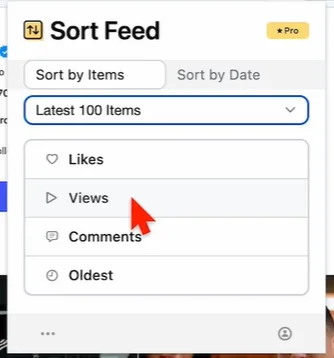
Outlier score is the default lens, but each metric answers a different question: sort by views for raw reach, by likes for resonance, by comments to locate controversy worth a response video, and by oldest to rebuild chronology after any sort. The store listing adds shares and custom metrics where a platform exposes them — the menu adapts per platform, as the Instagram panel here shows. Switching metrics re-ranks instantly, no re-scan needed.
Platform-specific walkthroughs live on Sort Feed for Instagram and Sort Feed for TikTok; the exact free/paid boundary is on the pricing page.
Put the outlier score to work
Version 13.1 installs in under a minute. Free for 25 posts per feed; Pro from $9/month.